ONVIF IP Camera Monitor (Onvifer) for PC
Modern IP Camera Video Management System Support 10,000+ models, Hi-Performance
- Rated
- Everyone
- Developer
- Biyee SciTech, Inc.
- Installs
- 2.1M+
- Google Play
- 4.5 (6.2K)
- Size
- 6.4 MB
What's new
This update addresses tile-refresh stability on certain hardware configurations, introduces Pro-tier tile background customization, and enhances the network discovery mechanism for camera enumeration.
Version 22.47 · · 6.4 MBLatest
The release restores video-frame tile updating for devices where it was previously unreliable, improves the Google Play licensing integration, and adds a Pro option to lock tile backgrounds to a fixed image rather than live video updates. Network discovery has also been optimized.
Version 22.33 · · 6.5 MB
The tile preview mechanism—which displays the most recent frame from your stream on the home screen—has received additional refinement. Package optimization remains a focus; the app's binary stays one-fifth the typical size, with tangible effects on startup latency and runtime memory efficiency, particularly beneficial on constrained devices.
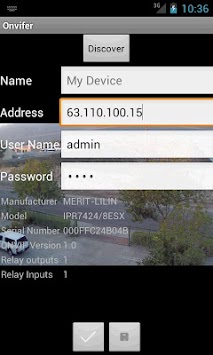
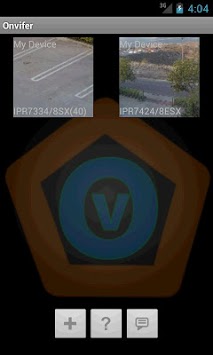
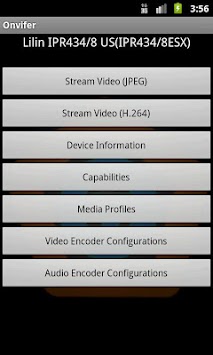
About ONVIF IP Camera Monitor (Onvifer) for PC
Key facts
- The app ONVIF IP Camera Monitor (Onvifer) was published by Biyee SciTech, Inc. and designed for Android mobile devices.
- This app can be operated on Windows PC or MAC through the use of an Android emulator.
- ONVIF IP Camera Monitor (Onvifer) enables users to stream live video from their IP cameras directly on mobile devices.
- The app supports two-way audio monitoring, allowing users to both speak to and listen from the app’s interface.
- It features cloud storage capability, storing recorded videos and snapshots securely for access anytime and anywhere.
Free download ONVIF IP Camera Monitor (Onvifer) for PC Windows or MAC from BoscoApp. Biyee SciTech, Inc. published ONVIF IP Camera Monitor (Onvifer) for Android operating system(os) mobile devices. However, if you ever wanted to run ONVIF IP Camera Monitor (Onvifer) on Windows PC or MAC you can do so using an Android emulator. At the end of this article, you will find our how-to steps which you can follow to install and run ONVIF IP Camera Monitor (Onvifer) on PC or MAC.
Whether day or night, with the Onvier app, you can watch your home security anytime and anywhere across the globe. Now it's time where security control of your home on your mobile; with the Onvier mobile app, you can easily monitor all your IP cameras in one place. You will see many powerful features like live camera feed, control camera settings, and motion detection that make the Onvier app a smart choice for people to use. Onvier is easy to use mobile app where you can power up your home security in one click.
Features
Let's check out some of the best features that you will see inside the Onvier mobile app:
Stream live video
Whether it is your home or your business property, the Onvier app allows you to watch the live streaming of IP cameras directly from your mobile. Connect your IP camera with the Onvier app and watch everything in real-time.
Supports audio
One of the added benefits of the Onvier mobile app where it supports audio monitoring. With the help of two way audio feature, users can speak and listen to all the surroundings directly from the Onvier mobile app anytime.
PTZ Control
Adjust your IP camera settings with just one click directly from the Onvier mobile app anytime and anywhere. Users can zoom in and zoom out and adjust the angle of the IP cameras using Onvier mobile app.
Cloud Storage
All your recorded data inside the Onvier mobile app is entirely safe. The Onvier app comes with cloud storage where your recorded videos, snapshots, and everything are stored in the cloud, where users can access it anytime and anywhere using the Onvier app.
Final Words
Overall, Onvier is the best and most reliable solution for everyone to watch live footage of IP cameras anytime. Just from the single screen, the Onvier app allows an easy option for the users to watch all the live coverage. The Onvier app supports multiple cameras where you can do PTZ control and comes with audio support, cloud storage, and much more. The User-friendly mobile app has many interesting features where you can connect IP cameras in one go. For anyone looking for a reliable solution to monitor home security, the Onvier mobile app is all you need.
Let's find out the prerequisites to install ONVIF IP Camera Monitor (Onvifer) on Windows PC or MAC without much delay.
Select an Android emulator: There are many free and paid Android emulators available for PC and MAC, few of the popular ones are Bluestacks, Andy OS, Nox, MeMu and there are more you can find from Google.
Compatibility: Before downloading them take a look at the minimum system requirements to install the emulator on your PC.
For example, BlueStacks requires OS: Windows 10, Windows 8.1, Windows 8, Windows 7, Windows Vista SP2, Windows XP SP3 (32-bit only), Mac OS Sierra(10.12), High Sierra (10.13) and Mojave(10.14), 2-4GB of RAM, 4GB of disk space for storing Android apps/games, updated graphics drivers.
Finally, download and install the emulator which will work well with your PC's hardware/software.
How to Download and Install ONVIF IP Camera Monitor (Onvifer) for PC or MAC:
- Open the emulator software from the start menu or desktop shortcut on your PC.
- You will be asked to login into your Google account to be able to install apps from Google Play.
- Once you are logged in, you will be able to search for ONVIF IP Camera Monitor (Onvifer), and clicking on the ‘Install’ button should install the app inside the emulator.
- In case ONVIF IP Camera Monitor (Onvifer) is not found in Google Play, you can download ONVIF IP Camera Monitor (Onvifer) APK file from this page, and double-clicking on the APK should open the emulator to install the app automatically.
- You will see the ONVIF IP Camera Monitor (Onvifer) icon inside the emulator, double-clicking on it should run ONVIF IP Camera Monitor (Onvifer) on PC or MAC with a big screen.
Follow the above steps regardless of which emulator you have installed.