
The Battle Cats for PC
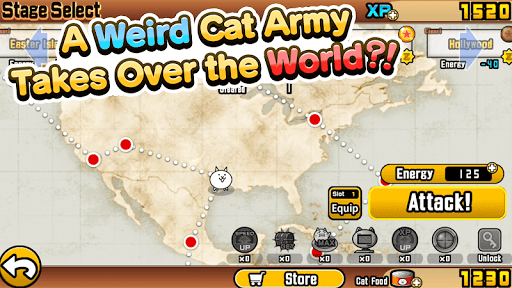
★★★Weirdly Cute Cats (?) rampage across the world! ★★★
- Rated
- Teen
- Developer
- PONOS Corporation
- Installs
- 43M+
- Google Play
- 4.5 (229.4K)
- Size
- 173.6 MB
What's new
Introduction of a Treasure Gauge mechanic that guarantees Superior Treasure rewards upon gauge completion, addressing reward consistency across treasure-enabled stages and other progression activities.
Version 15.7.0 · · 173.6 MBLatest
The Treasure Gauge accumulates progress from stage clears and various gameplay actions; once filled, it triggers a guaranteed Superior Treasure drop. This applies to treasure stages and many others. The update also expands the roster with new True Forms, Ultra Forms, and Ultra Talents, plus additional Legend Map stages and difficulty tiers.
Version 15.6.1 · · 180.4 MB
The update addresses identified issues from the previous release, refining the vibration feedback implementation and ensuring stable performance across new legend stage difficulties and cat combo interactions. Settings and in-battle controls receive targeted improvements.

About The Battle Cats for PC
Key facts
- The Battle Cats is published by PONOS Corporation and can be played on Android devices or on PC and MAC using an Android emulator.
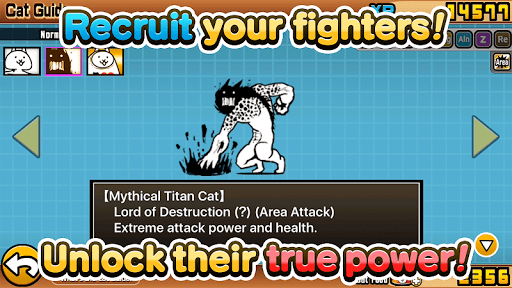
- The game revolves around assembling an army of quirky and cute cats to battle against other cat armies.
- It features a simple battle system where players use a cat cannon and tap controls to manage their cat army.
- There is a straightforward leveling system where players can increase their experience points (XP) and evolve their cats.
- The Battle Cats offers a variety of activities including collecting treasures worldwide, exploring numerous levels and stages, and completing different challenges.
Free download The Battle Cats for PC Windows or MAC from BoscoApp. PONOS Corporation published The Battle Cats for Android operating system(os) mobile devices. However, if you ever wanted to run The Battle Cats on Windows PC or MAC you can do so using an Android emulator. At the end of this article, you will find our how-to steps which you can follow to install and run The Battle Cats on PC or MAC.
There are some epic battle games in the app stores but The Battle Cats is a whole different level apart from other games. This game is all about fighting battles with weird yet adorable cats. You can now have your own weird army of cats to fight the other vicious cats in the game. You can command all your cats with a few simple controls in any battle.
Superb Battle System
The battle system in The Battle Cats is an amazingly simple way to fight weird cats. You can now battle with all the cats that you want. The whole app is made in a simple way for you to play around with. You don’t have to worry about complex controls or gameplay, because it’s all about getting the most of this simple game.
All you have to do is tap on a cat that you want to send out to the battle. Use the cat cannon to fire at your enemies and overcome all the enemies you can by using the right squad of cats. You can now take down the enemy base.
Simple Leveling System
The leveling system in The Battle Cats is beyond amazing. You can now find ways to increase your XP and level up the cats your way. You don’t have to worry about complex levels and XP levels. It’s all simple and you can see them evolve on their own to help you. When you’re playing the battle cats, you’ll see different ways to level up and become the ultimate warrior.
Lots to Do
When you’re playing The Battle Cats, you get to collect amazing treasures across the world. You can show these treasures to your friends and boast of the magic and wonders of your feline army. There are almost hundreds and hundreds of different levels and stages that you can play across.
You can collect power ups, wade through the story mode, adventures, and even do challenges of each legend.
The Battle Cats bends all odds and lets you explore more about the world of battle through feline creatures. If you’re interested in becoming the ultimate champion of The Battle Cats, start playing today!
Let's find out the prerequisites to install The Battle Cats on Windows PC or MAC without much delay.
Select an Android emulator: There are many free and paid Android emulators available for PC and MAC, few of the popular ones are Bluestacks, Andy OS, Nox, MeMu and there are more you can find from Google.
Compatibility: Before downloading them take a look at the minimum system requirements to install the emulator on your PC.
For example, BlueStacks requires OS: Windows 10, Windows 8.1, Windows 8, Windows 7, Windows Vista SP2, Windows XP SP3 (32-bit only), Mac OS Sierra(10.12), High Sierra (10.13) and Mojave(10.14), 2-4GB of RAM, 4GB of disk space for storing Android apps/games, updated graphics drivers.
Finally, download and install the emulator which will work well with your PC's hardware/software.
How to Download and Install The Battle Cats for PC or MAC:
- Open the emulator software from the start menu or desktop shortcut on your PC.
- You will be asked to login into your Google account to be able to install apps from Google Play.
- Once you are logged in, you will be able to search for The Battle Cats, and clicking on the ‘Install’ button should install the app inside the emulator.
- In case The Battle Cats is not found in Google Play, you can download The Battle Cats APK file and double-clicking on the APK should open the emulator to install the app automatically.
- You will see the The Battle Cats icon inside the emulator, double-clicking on it should run The Battle Cats on PC or MAC with a big screen.
Follow the above steps regardless of which emulator you have installed.