Solid Explorer File Manager for PC
Powerful file manager and cloud manager with root explorer.
- Rated
- Everyone
- Developer
- NeatBytes
- Installs
- 13M+
- Google Play
- 4.6 (75.7K)
- Size
- 21.2 MB
What's new
| Version | 3.3.1 |
|---|---|
| Size | 21.2 MB |
| What's new | v 3.3.0/1- ability to analyze storage usage for any cloud client (Pro)- fixed app freeze when browsing SMB shares- other minor fixesv3.2.16- fixed Dropbox accessSolid Explorer 3.0- modern Material theme with dynamic color support (Android 12 and up) - Material and Expressive icon sets - Video Player - Web file sharing- Storage Analyzer- more to come |
About Solid Explorer File Manager for PC
Solid Explorer File Manager: The Ultimate Tool for Android File Management
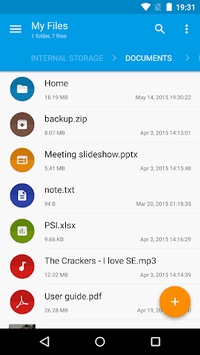
Solid Explorer File Manager stands out as one of the most versatile and user-friendly file management tools available for Android devices. Whether you're looking for a robust file manager for local files or need a competent solution for cloud storage and network shares, Solid Explorer delivers in spades. With a sleek design and a plethora of features, it makes file organization and transfer tasks straightforward and actually enjoyable.
Effortless File Management Across Multiple Storage Solutions
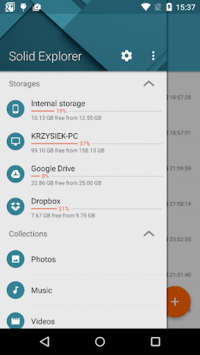
Solid Explorer File Manager doesn’t limit you to just managing files on your internal storage. It enables seamless integration with a variety of cloud services, including Google Drive, Dropbox, and OneDrive. Moreover, it offers excellent support for NAS (Network Attached Storage) and FTP servers, making it a true multi-platform file management tool. This diversity makes it a perfect companion for anyone needing extensive and flexible storage options.
Two-Pane Design for Quick and Easy Navigation
One of the standout features of Solid Explorer is its two-pane design. This intuitive setup allows users to open two folders simultaneously and drag and drop files between them. It's an incredibly efficient way to manage files, especially when dealing with large numbers of documents, images, or any other file type. This feature alone sets it apart from many other file managers that lack such streamlined navigation methods.
Support for Compressed Files and File Transfers
Handling compressed files can often be cumbersome, but not with Solid Explorer. The app supports various archive formats, allowing users to easily unzip and manage compressed files directly within the app. Additionally, it excels in file transfer tasks, whether you’re copying, pasting, or moving files between different locations. While transfer speeds can vary, especially with network locations, the process remains reliable and generally fast.
User-Centric Design and Customization
Solid Explorer places a strong emphasis on user experience. The app is not only functional but also stylish, featuring a modern interface that can be customized to suit individual preferences. Users can personalize their experience with different themes, including a dark mode, and a choice of color schemes. This attention to detail ensures that the app is as visually appealing as it is practical.
Enhanced Security Features
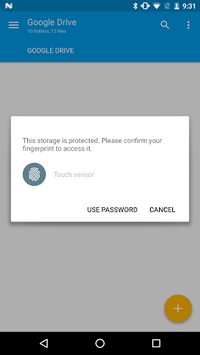
For users concerned about security, Solid Explorer File Manager includes advanced features like file encryption. This allows for the secure storage of sensitive files, offering peace of mind in an increasingly digital world. Protect your important documents with ease, knowing that Solid Explorer has robust security measures in place.
Built-in Extras for a Premium Experience
Beyond its core functionalities, Solid Explorer comes packed with handy extras. It includes a built-in image viewer and text editor, making it a versatile tool for a variety of tasks. The app also supports plugins, extending its capabilities to include file sharing, media streaming, and more. These additional features ensure that Solid Explorer remains indispensable for both personal and professional use.
Stable and Intuitive
Solid Explorer File Manager is praised for its stability and intuitive user interface. The well-thought-out design makes it easy to access and manage files quickly. Even if you’re new to file management apps, you’ll find the learning curve gentle and the app's navigation intuitive. This reliability and ease of use make it a favorite among users who need a dependable file management solution.
In summary, Solid Explorer File Manager excels in providing a comprehensive file management solution for Android users. Its wide array of features, coupled with a user-friendly interface and robust security options, make it the go-to choice for anyone in need of an effective and stylish file manager.