
Skinseed for Minecraft for PC
Skin Creator & Skins Editor for Minecraft
- Rated
- Everyone
- Developer
- Africa Sunrise
- Installs
- 11M+
- Google Play
- 4.6 (31.9K)
- Size
- 76.3 MB
What's new
The latest release resolves backend issues through targeted bug fixes, strengthening application stability across core features.
Version 27.1.2 · · 76.3 MBLatest
This update applies fixes that address underlying stability issues within the app's core systems. The refinements help prevent runtime errors and ensure the editor, search, and preview functions operate without interruption, particularly during intensive workflows.
Version 6.6.2 · · 58.7 MB
The copy and paste correction eliminates an operational impediment during skin creation and editing. The search page overhaul reorganizes database navigation to reduce query time and improve discoverability across the two million skin catalog.
About Skinseed for Minecraft for PC
Key facts
- Skinseed for Minecraft is a mobile app developed by Africa Sunrise that allows users to create, edit, and share custom skins for Minecraft.
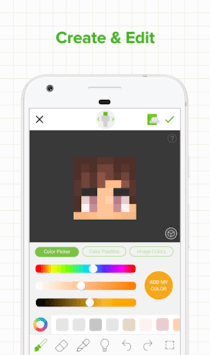
- The app includes an inbuilt skin editor offering tools like drawing and erasing, enabling users to design their custom skins easily.
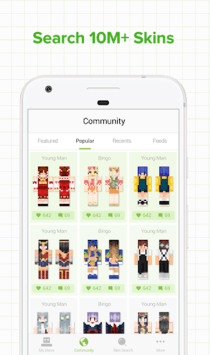
- Skinseed features an extensive library of pre-made skins that users can select and customize further to suit their preferences.
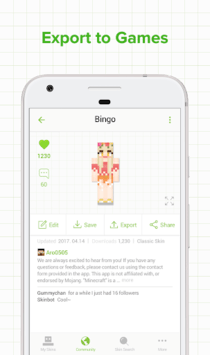
- Users can export their custom skins directly from the app to use in their Minecraft games.
- The app provides a 3D model feature, allowing views of how skins will look in-game before exporting.
Free download Skinseed for Minecraft for PC Windows or MAC from BoscoApp. Africa Sunrise published Skinseed for Minecraft for Android operating system(os) mobile devices. However, if you ever wanted to run Skinseed for Minecraft on Windows PC or MAC you can do so using an Android emulator. At the end of this article, you will find our how-to steps which you can follow to install and run Skinseed for Minecraft on PC or MAC.
Everyone heard about Minecraft. Do you know you can edit custom skins in Minecraft? With the Skinseed for Minecraft app, users can easily create and edit custom skins from their mobile devices. The most popular app, Skinseed for Minecraft, creates, edits, and shares skin across the globe. Easy-to-use app with a wide range of editing tools to create customized skins. Users can select from various designs, and with the Editor's help, they can create their custom skins. Once you are done with the editing, Skinseed allows it to share with other players.
Features
Want to know what's inside the app? Read further to know the Skinseed app features:
Inbuilt Editor
The Skinseed app allows users to create and edit their skin in a customized manner with its inbuilt skin editor. Users can easily make designs to create custom skins. The Editor has various options like drawing, erasing, and much more. Create an interesting look early.
Extensive Library
To start designing custom skin inside the Skinseed app, users can get an extensive library of pre-made skins to select and free to use. Inside the library, you will get all the sizes, colors, shapes, and more. You can also add filters and much more to make a perfect character.
Easy to export
Once the design of your skin is done, the app allows its user to export the skin you can use in the game. By clicking on the export button, it's easy for users to export the skin quickly.
3D Models
Now, this powerful feature gives your custom skin a 3D look. Using the 3D model feature, you can view how your skin will look in the game without export. The Create custom 3D model for your skins feature is a fantastic way for app users to customize their skins quickly and effectively.
Final Words
Excellent app for creating and making attractive Minecraft skins. The app has creative tools and makes it easy to edit the skins. Users can add colors and textures and share the skins with their friends. Create your Minecraft character easily with the Skinseed for Minecraft app.
Let's find out the prerequisites to install Skinseed for Minecraft on Windows PC or MAC without much delay.
Select an Android emulator: There are many free and paid Android emulators available for PC and MAC, few of the popular ones are Bluestacks, Andy OS, Nox, MeMu and there are more you can find from Google.
Compatibility: Before downloading them take a look at the minimum system requirements to install the emulator on your PC.
For example, BlueStacks requires OS: Windows 10, Windows 8.1, Windows 8, Windows 7, Windows Vista SP2, Windows XP SP3 (32-bit only), Mac OS Sierra(10.12), High Sierra (10.13) and Mojave(10.14), 2-4GB of RAM, 4GB of disk space for storing Android apps/games, updated graphics drivers.
Finally, download and install the emulator which will work well with your PC's hardware/software.
How to Download and Install Skinseed for Minecraft for PC or MAC:
- Open the emulator software from the start menu or desktop shortcut on your PC.
- You will be asked to login into your Google account to be able to install apps from Google Play.
- Once you are logged in, you will be able to search for Skinseed for Minecraft, and clicking on the ‘Install’ button should install the app inside the emulator.
- In case Skinseed for Minecraft is not found in Google Play, you can download Skinseed for Minecraft APK file from this page, and double-clicking on the APK should open the emulator to install the app automatically.
- You will see the Skinseed for Minecraft icon inside the emulator, double-clicking on it should run Skinseed for Minecraft on PC or MAC with a big screen.
Follow the above steps regardless of which emulator you have installed.