
SCRUFF for PC
Gay chat, dating & social
- Rated
- Mature 17+
- Developer
- Perry Street Software, Inc.
- Installs
- 12M+
- Google Play
- 4.3 (79.3K)
- Size
- 41.7 MB
What's new
Version 8.19.1 · · 41.7 MBLatest
- Trending Moments
- Updated navigation in the Moments feed
- Nearby Moments appear on your profile
Recent Features
- Tap in to join group Moments
- Moments in Nearby
More at: https://www.scruff.com/releasenotes
Version 8.18.0 · · 45.0 MB
The UI refinement targets Moments discoverability through two structural changes: the feed navigation reorganization reduces interaction depth, while elevating Nearby Moments to profile prominence makes geographically relevant content immediately visible. These changes optimize the path to engaging with trending local content.

About SCRUFF for PC
Key facts
- SCRUFF is an LGBTQ+ oriented social and dating app specifically designed for gay, bisexual, transsexual, and queer individuals.
- The app was created by an LGBTQ+ owned company focused on fostering a private, secure, and diverse community.
- SCRUFF boasts a powerful search engine with filters, allowing users to make precise connections locally or globally within a community of over 15 million members.
- Users of SCRUFF can express themselves freely without judgment, enhancing their chances of finding compatible connections.
- The app also hosts unique queer quiz shows, providing entertainment and opportunities to win prizes while making connections.
Free download SCRUFF for PC Windows or MAC from BoscoApp. Perry Street Software, Inc. published SCRUFF for Android operating system(os) mobile devices. However if you ever wanted to run SCRUFF on Windows PC or MAC you can do so using Android emulator. At the end of this article you will find our how-to steps which you can follow to install and run SCRUFF on PC or MAC.
Scruff
Isn’t it frustrating when you’re a homosexually oriented person and all the dating apps that you see are just made for straight people? This has to be one of the most depressing things out there, especially for the LGBTQ community. This is where Scruff comes in. Scruff is the number one app that lets you connect with gay, bi-sexual, transexual, and even queer guys.
We’re not kidding, Scruff is an LGBTQ owned company that created a private and comfortable experience where gay people can foster a friendly and diverse community. This is not just any gay dating app, it’s a community where people can find one another.
Here are some interesting features of the Scruff app.
Make Real Connections
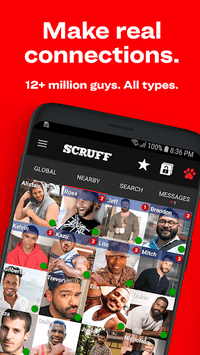
The Scruff community has over 15+ million members. You don’t have to deal with spambots or nosy people who waste time. You can now find exactly the guys you like using the powerful search engine. The Scruff app has a great search engine and also has powerful filters to find the perfect guy for you. You can either choose to explore the guys in your neighborhood or even anywhere around the world. You can connect with the people you like.
Connect in New Ways
You can also connect with others in ways like never before. As you keep exploring the guys in the community, you’ll also notice that Scruff optimizes the guys you like. It’ll keep helping you with finding more people who you like and it’ll give you a better experience. This way, you can connect in new and unique ways.
Express Yourself
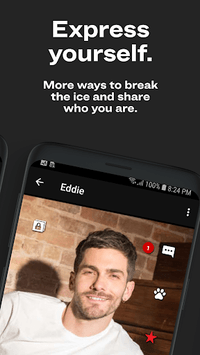
Scruff is a place where you can express yourself. You can show everything you like and everything you’re into. This is a community where you won’t be judged for the kind of person you are.
Hosting
Scruff also hosts the best queer quiz shows in the world. These quiz shows will also help you score points and grab huge cash prizes. You can also see who’s playing nearby you and who’s not. Talk and make connections with guys while playing these fun quiz games.
Scruff app also provides a safe experience by not sharing your private details with anyone else. You can be guaranteed that all your information will be stored safely. This way, you can freely communicate with anyone on Scruff.
Let's find out the prerequisites to install SCRUFF on Windows PC or MAC without much delay.
Select an Android emulator: There are many free and paid Android emulators available for PC and MAC, few of the popular ones are Bluestacks, Andy OS, Nox, MeMu and there are more you can find from Google.
Compatibility: Before downloading them take a look at the minimum system requirements to install the emulator on your PC.
For example, BlueStacks requires OS: Windows 10, Windows 8.1, Windows 8, Windows 7, Windows Vista SP2, Windows XP SP3 (32-bit only), Mac OS Sierra(10.12), High Sierra (10.13) and Mojave(10.14), 2-4GB of RAM, 4GB of disk space for storing Android apps/games, updated graphics drivers.
Finally, download and install the emulator which will work well with your PC's hardware/software.
How to Download and Install SCRUFF for PC or MAC:
- Open the emulator software from the start menu or desktop shortcut in your PC.
- You will be asked to login into Google account to be able to install apps from Google Play.
- Once you are logged in, you will be able to search for SCRUFF and clicking on the ‘Install’ button should install the app inside the emulator.
- In case SCRUFF is not found in Google Play, you can download SCRUFF APK file and double clicking on the APK should open the emulator to install the app automatically.
- You will see the SCRUFF icon inside the emulator, double clicking on it should run SCRUFF on PC or MAC with a big screen.
Follow above steps regardless of which emulator you have installed.