NetShare - no-root-tethering for PC
Share your internet or extends your existing Wifi connection as a WiFi Repeater
- Rated
- Everyone
- Developer
- NetShare Softwares
- Installs
- 16M+
- Google Play
- 4.0 (3.4K)
- Size
- 1.4 MB
What's new
| Version | 279 |
|---|---|
| Size | 1.4 MB |
| What's new | Fixed pppd and ssts connection scripts for Windows and Mac OS disable PiP by default. Upgraded target android version |
About NetShare - no-root-tethering for PC
Discover NetShare - No-Root-Tethering
Looking for a reliable way to share your internet connection without the hassle of using your phone data or Wi-Fi hotspot? Look no further than NetShare - No-Root-Tethering. This innovative app allows you to turn your phone into a Wi-Fi hotspot without the need for root access, offering a solution for sharing internet easily and conveniently.
Setting Up and Using NetShare - No-Root-Tethering
Setting up NetShare - No-Root-Tethering is straightforward and user-friendly. Even if you're not tech-savvy, you can get it running in no time. Here's a quick guide on how to get started:
- Install NetShare on your device from the Google Play Store.
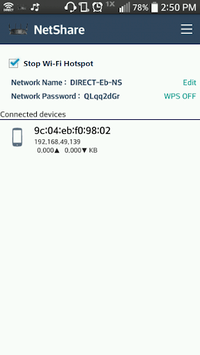
- Open the app and start the hotspot.
- On your computer or other device, go to Internet options, navigate to LAN settings, and input the proxy address and port provided by NetShare.
- Connect to the Wi-Fi hotspot created by NetShare on your device.
Whether you are using a prepaid ATT, Verizon, or T-Mobile service, NetShare works effectively. Just restart the app to resolve any connection issues. Clear the app cache or rename the hotspot if you experience slowdowns. Simple steps like these can significantly enhance your internet sharing experience.
Advantages of Using NetShare
NetShare offers several advantages that make it stand out from other tethering apps:
- No Root Needed: Many tethering apps require root access, but NetShare saves you from that trouble. Just install and go.
- Fast and Reliable Connection: Achieve speeds up to 60 Mbps on 4G LTE, allowing you to stream videos and browse the internet without buffering.
- Works Across Multiple Devices: Connect several devices simultaneously and enjoy a stable connection. Perfect for those who travel or work remotely.
- Extends Wi-Fi Range: Use NetShare to improve Wi-Fi reception in areas with poor signal. Great for using Wi-Fi in coffee shops or large rooms.
- Cost-Effective: The free version offers substantial functionality, with the pro version extending capabilities and providing an even better experience.
Practical Applications of NetShare
NetShare's versatility makes it an ideal solution for various scenarios:
- Compatibility with Different ISPs: Whether you're on a prepaid plan or a major network like Verizon, NetShare adapts well to different internet service providers.
- Work and Play: Stream HD content on platforms like Netflix and YouTube without interruption, making it suitable for both work and entertainment.
- Travel and Remote Work: If you're on the road or working from different locations, NetShare ensures you stay connected without relying on unstable Wi-Fi networks.
- Multi-Device Connectivity: Ideal for situations where you need to connect multiple devices but only have one Ethernet cable or limited internet access.
Points to Consider
While NetShare provides an excellent internet-sharing solution, it does come with a few caveats:
- Interface and Instructions: The app’s interface may be tricky for some users. Follow the instructions carefully to avoid connection issues.
- USB Tethering: Although effective with Wi-Fi, USB tethering might face some stability issues. Stick with Wi-Fi for the best experience.
- Privacy Concerns: Be mindful of data privacy when using the proxy feature. Ensure you understand the app’s privacy policies.
- Traffic Limitations: The free version may have limited traffic, which can be bothersome during important tasks such as video calls.
Enhance Your Connectivity with NetShare
NetShare - No-Root-Tethering is an essential tool for enhancing your internet connectivity by offering a no-root hotspot solution that is both easy to set up and highly effective. Whether you're looking to improve your Wi-Fi range or share your internet connection across multiple devices without rooting your phone, NetShare stands out as a reliable and user-friendly option.