
CameraFi Live for PC
Live stream your special moments anytime on YouTube, Facebook and Twitch.
- Rated
- Everyone
- Developer
- Vault Micro, Inc.
- Installs
- 20M+
- Google Play
- 3.9 (42.2K)
- Size
- 87.1 MB
What's new
| Version | 1.34.4.0320 |
|---|---|
| Size | 87.1 MB |
| What's new | Minor bug fixes and improvements. Install or update to the newest version to check it out! |

About CameraFi Live for PC
Enhance Your Live Streaming with CameraFi Live
CameraFi Live is an amazing app designed to make live streaming a breeze, whether you're using an iPhone or an Android device. It offers versatile streaming options and caters to both beginners and experienced streamers. The app stands out with its user-friendly interface and robust feature set.
Streaming on Multiple Platforms
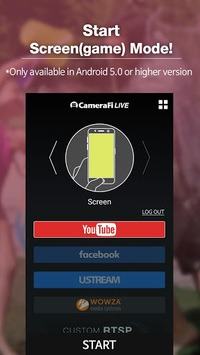
CameraFi Live allows you to stream on multiple platforms simultaneously. This feature is fantastic for content creators who want to broadcast their live sessions on various social media sites at once. The app supports custom RTMP streams, making it easy to connect to most social media sites.
High-Quality Video and Audio
With CameraFi Live, you can enjoy crystal-clear video and audio quality. Whether streaming for a few minutes or hours, the app ensures that your content is delivered without buffering, providing your audience with a seamless viewing experience. It also supports internal audio capture, perfect for streaming videos and team voice communications clearly.
User-Friendly Features and Customization
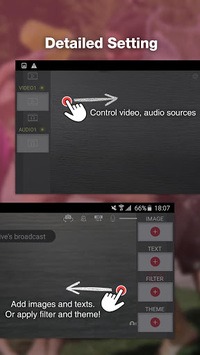
CameraFi Live offers many features to enhance your live streams. You can add image overlays, although there's a wish for the app to allow overlaying images directly from the phone gallery. This customization could make your streams even more engaging. The app also has the potential to support animated video overlays, such as "Stream Starting Soon" videos, giving a professional touch.
Perfect for YouTubers and More
CameraFi Live is well-suited for YouTubers and other content creators. The app continues to receive appreciation for smoothly running long streaming sessions on platforms like YouTube. This makes it an excellent choice for gamers who stream for extended periods or for anyone hosting a live session of any kind.
Reliability and Performance
CameraFi Live is known for its reliability. Users have found it to be stable and effective for long streaming sessions. It does, however, occasionally face minor issues such as difficulty accepting payments for subscriptions or minor glitches in live streams. Nonetheless, the positive aspect is that these issues do not significantly impact overall usability.
Getting Started is Easy
Starting with CameraFi Live is straightforward. The app offers a free version with all the necessary features to start live streaming. While the basic version may have some limitations, it provides an excellent entry point. If you decide to upgrade, the transition is smooth, provided the payment process works seamlessly.
Adding Value to Live Streams
One of the standout features of CameraFi Live is its ability to add extra media elements to live streams. Users can show their audience pictures and video clips during the stream, making the content more interactive and engaging. This adds a professional touch and keeps the audience hooked.
Conclusion
CameraFi Live is a remarkable app for anyone looking to engage in live streaming on mobile devices. Its straightforward interface, multi-platform capabilities, and high-quality audio and video make it a prime choice. With scope for future enhancements, such as better gallery integration for overlays and improved payment acceptance, CameraFi Live remains an excellent tool for live streaming enthusiasts.