Bluetooth Auto Connect for PC
Auto Connect To Your Bluetooth Devices
- Rated
- Everyone
- Developer
- UniqTec Inc.
- Installs
- 5M
- Google Play
- 3.9 (22.1K)
- Size
- 11.5 MB
What's new
| Version | 5.9.0 |
|---|---|
| Size | 11.5 MB |
| What's new | Fixed connection errors, improved application performance. |
About Bluetooth Auto Connect for PC
Bluetooth Auto Connect: Revolutionizing Hands-Free Connectivity
Have you ever found it frustrating to manually connect your phone to various Bluetooth devices every day? Bluetooth Auto Connect aims to solve this common problem. This app simplifies the process of connecting to Bluetooth devices like car stereos, speakers, smartwatches, and more. By automating the connection process, it ensures a seamless and hassle-free experience.
Convenient Connectivity for Cars
One standout feature of Bluetooth Auto Connect is its ability to effortlessly link your phone to your car's Bluetooth receiver. Typically, connecting a phone to a car stereo can be a tedious process that involves navigating through multiple settings. However, with Bluetooth Auto Connect, as soon as you start your car and place your phone on a wireless charging base, the app automatically scans for paired devices and connects within seconds. This makes driving much safer and more enjoyable.
Enhancing Smartwatch Usability
If you own a smartwatch, you may have experienced issues with it disconnecting frequently. Bluetooth Auto Connect ensures your smartwatch stays connected to your phone without any manual intervention. This means you can rely on your smartwatch for notifications, calls, and other features without worrying about losing the connection.
Perfect for Home Audio Systems
Bluetooth Auto Connect is also ideal for connecting to home audio systems, such as Bluetooth speakers and boomboxes. For instance, when you plug your phone into a charger before bed, the app can automatically connect to your bedside Bluetooth boombox. This allows you to enjoy your favorite music or audiobooks without any interruptions.
Seamless Integration with New and Old Devices
One of the most impressive aspects of Bluetooth Auto Connect is its compatibility with both new and older Bluetooth devices. Whether you have a state-of-the-art Bluetooth headset or an older speaker, this app can ensure a steady connection. Additionally, it has settings that allow users to tweak the connection process, which is especially useful for devices that struggle with auto-connect features.
Improving Post-Update Compatibility
Software updates can sometimes disrupt Bluetooth settings, making it challenging to pair devices that worked perfectly before. Bluetooth Auto Connect offers a reliable solution by helping re-establish these connections effortlessly. This app proves to be especially useful after major software updates, ensuring your devices remain functional.
Battery Efficiency
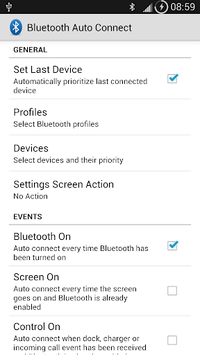
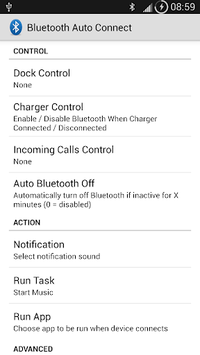
Bluetooth Auto Connect isn't just about making connections easier; it also helps save battery life. By automatically turning off Bluetooth after a specified period, it ensures that your phone's battery isn't drained unnecessarily. This feature is particularly helpful for those who often forget to switch off Bluetooth, extending the time between charges.
Universal Compatibility
A significant advantage of Bluetooth Auto Connect is its universal compatibility across different devices and brands. Whether you have multiple phones, different models, or various Bluetooth gadgets, this app ensures a unified and smooth connection experience. This makes it an invaluable tool for anyone juggling numerous Bluetooth-enabled devices.
Easy Setup and User-Friendly Interface
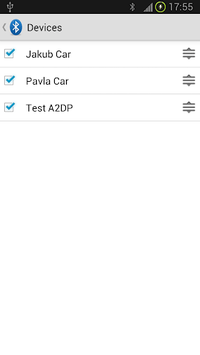
Setting up Bluetooth Auto Connect is a breeze. It takes only a few minutes to get started, and the app's interface is intuitive and straightforward. Users can quickly pair their devices and adjust settings as needed, making it accessible even for those who are not tech-savvy.
Advanced Features
For those who enjoy customizing their tech experience, Bluetooth Auto Connect offers advanced settings. Users can modify retry counts, connection intervals, and even configure the app to work with special devices like gaming controllers. These advanced features provide greater control over how and when devices connect.
Ad-Free Experience
Unlike many free apps, Bluetooth Auto Connect is ad-free, providing a smooth and uninterrupted user experience. This is a significant plus for users who want an efficient and distraction-free app.
Bluetooth Auto Connect stands out as a must-have app for anyone looking to simplify their Bluetooth connections. With its user-friendly interface, advanced customization options, and reliable performance, it’s an excellent tool for enhancing your daily tech interactions.